Showing posts with label Web. Show all posts

The Story of JavaScript - How did JavaScript originate and evolve

Hi Guys, in this post I will explore how JavaScript came into existence, as we all know, JavaScript is the world's most popular programming language, its good to know its history and it goes as below -

JavaScript is a client side scripting language developed by Brendan Eich of Netscape Corporations under the name Mocha.

Mocha was later renamed to LiveScript, and then finally to JavaScript mainly as was it was influenced by the Java programming language. 

LiveScript was the official name when it first shipped in beta releases of Netscape Navigator 2.0 in September 1995, it was renamed JavaScript in a joint announcement with Sun Microsystems on December 4, 1995 when it was deployed in the Netscape browser version 2.0 .

The change of name from LiveScript to JavaScript coincided with Netscape adding support for Java technology in its Netscape Navigator web browser. 

When to use Xml and when to use JSON


XML

JSON

You need message validation

You don't need Messages to be validated

XML transfer is slower then JSON since the file size is relatively compared to JSON.

JSON is a good if you want to transmit data faster from client to server, due to reduced file size

You need to transform the XML i.e. if  using XSLT

You're not transforming messages, or transforming their de serialization is simple

Your messages include a lot of marked-up text

Your messages are mostly data, not marked-up text

You need to interoperate with environments that don't support JSON

The messaging endpoints have good JSON tools

Used when objective is to carry or store data

Used when objective is to display the Data

When there is no concern for reduced file/transfer size.

When there is a requirement for reduced file/transfer size.

Processing is slower since XML has to be parsed with XML parser.

Processing is faster since JSON can be parsed by a standard JavaScript function.


Different Types of Selectors in CSS. Difference Between Class Selector - ID Selector - Element Selector - Grouped Selector - Universal Sector - Child Selector - Descendant Selector - Adjacent Sibling Selector - General Sibling Selctor in CSS


CSS selectors are used to define the HTML elements to which a set of CSS rules are applied.
That is we have multiple HTML Elements / Tags in HTML page, but if we need to set CSS properties to a set of specific html elements like p tags or set of elements like div tags etc then we go for CSS Selectors,

There are different types of selectors in CSS, This post explores all the CSS Selectors
  1. Class selector (.)
  2. ID selector (#)
  3. Element selector
  4. Grouped selector
  5. Universal selector (*)
  6. Child Selector (>)
  7. Descendant Selector (space)
  8. Adjacent Sibling Selector (+)
  9. General Sibling Selector (~)

1) Class selector (.)

Class selector finds elements with specific class across the HTML page and applies the CSS to the elements that have the respective class value set.

The class selector uses the HTML class attribute, and is defined with a dot i.e. "."
In the example below, all HTML elements with class="center" will be center-aligned:

Syntax - .className { Property: Value }
The CSS style will then be applied to all tags with class names mentioned above.

How to Remove line breaks for Block Level Elements like div,h1,ul,p tags using CSS in HTML

In this post I will show you how to remove the line breaks or new lines created when we use Block Level Elements like div or Header elements or other tags like ul or paragraph tags etc.


As we all know that
Block Level Elements are HTML Elements that normally start (and end) with a new line when displayed in a browser.

In case our Requirement is that We need no  new lines when using block Lines we go for these CSS scripts

How to get the root node name of an xml document /node name of any xml element using XPath name() function in Expression Shape BizTalk Server with Examples

Hi, this posts explains how to use XPath Expressions to get the Node Name of an XML Document.
The Xpath expression can be used inside the Expression shape of BizTalk server using the xpath function.

If the business process is tied to the XML then Root Node name can be used to identify the business process being executed in BizTalk Server.

We can get the Root Node name or name of any node using the name() function, by passing  XPath as input parameter

Syntax:
name(XPath Expression)

Example

Input XML
<OrderId>
<OrderRecord>
       <Place>ALT</Place>
       <Date>21-Aug-2011</Date>
</OrderRecord>
<OrderNo>123</OrderNo>
</OrderId>
i) name(/*) 
Result: OrderId

ii) name(/*/*)
Result: OrderRecord

iii) name(/*/*[2])
Result: OrderId


DIfferent Namespaces in XML Schema

Introduction -

Hi Everyone, in this post I will explore the structure of XML Schema language and namespaces in a schema language.
It is suggested the reader to have basic understanding of namespaces in XML and also knowledge about XML Schema.
If the reader is not familiar about XML Namespaces please refer to my earlier post titled "Namespace in XML"

Description -

Defn - XML Schema is a XML based language used for defining the structure of an XML document.

In a XML Schema language the first element should always be the element with name "schema" and this element comes immediately after the XML declaration.
The element contains attributes and has few namespaces that complete the XML Schema document. 

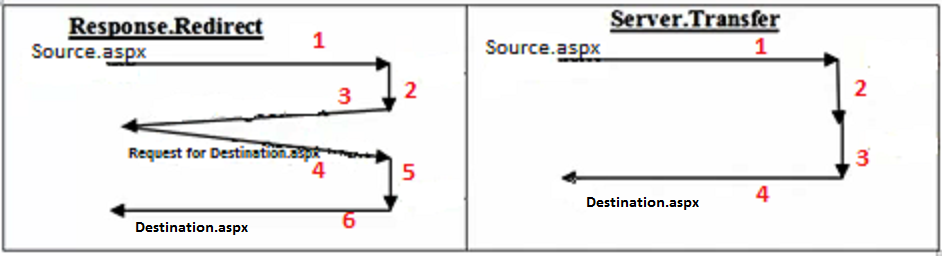
Difference between Response.Redirect and Server.Transfer in ASP.Net

Hi in this post, I will be exploring the Response.Redirect and Server.Transfer redirecting options available in ASP.NET

Response.Redirect is used to redirect the page to a page in the same server or different server
Server.Transfer is used to redirect the page to a page in the same server only

Example :
RR - Response.Redirect("LoginPage.aspx")
Response.Redirect("LoginPage.htm")
Response.Redirect("yourSiteName.com/LoginPage.aspx")

ST - Server.Transfer("LoginPage.aspx")

Working

Let, in Source.aspx there is a button (or LinkButton or ImageButton or any control that causes a post back) and the button event contains the code Response.Redirect or Server.Transfer

BLOGPIC - Copy

What are Namespace in XML and Different ways of adding Namespace to a XML

Introduction

Namespace in XML gives uniqueness to the elements/attributes.
Namespace in XML can be compared to packages in java or namespaces in DotNET.
Namespace in a xml document are declared using attribute xmlns and any prefix character.

Syntaxxmlns:prefix="URI"

here, xmlns stand for XML Namespace
and prefix can be anycharacters

Example - 

<?xml version="1.0"?>

<root xmlns:nm1="http://www.web1.com"
xmlns:nm2='http://www.web2.com">
<nm1:elem1>Element 1</nm1:elem1>
<nm2:elem2>Element 2</nm2:elem2>
<nm1:elem3>Element 3</nm1:elem3>
<nm2:elem4>Element 4</nm2:elem4>
</root>

Difference between top level domain and second level domain in a website

A Domain Name consists of two or more words separated by a period.
For example : mydomain.com,
The first part ‘.com’ is called a top-level domain
The second part ‘mydomain’ is called a second-level domain.

Here the Top-Level domain is the suffix to the right of the dot (i.e. com) and the second-level domain (SLD) is the part of the domain to the left of this dot (i.e. mydomain).

What does TLD means???

TLD means Top Level Domain.
All domains have a TLD  i.e.  .net, .com, .org, .biz, .info, etc., portion of a domain name.
The term TLD refers to any (or all) of the top-level domain names.

Three Ways of Applying/Adding CSS to HTML

Hi Everyone,

In this post I will explore the ways of applying CSS to a  web page
I will be focusing only on ways of applying CSS and not on exploring CSS, hence prior knowledge of CSS is very much required.

There are three ways of applying CSS to our webpage
1)Inline
2)Internal
3)External