Showing posts with label DotNET. Show all posts

How to Save or Read PDF or any File to or from a varbinary column in Sql Server - simplest C# code

Hi Guys, This post is a continuation to my earlier post where I wrote about searching for text in pdf files, In my earlier post I had shared query to insert the pdf's using Sql Server Open Rowset.

This post will explore saving and retrieving pdf files to or from a database table - In this sample code I have hard coded the values for better understanding, in real time we fetch these values from a database table or an excel.

The below code is for a Console Application -
Here the column "fileContent" is of type varbinary.

How to Search for Text inside PDF Files in SQL Serve part2 – Solution to Syntax error near '' in the full-text search condition '’ in Sql Server

Hi Guys, In my previous post
http://pnsoftwarestudies.blogspot.com/2017/03/how-to-search-for-text-inside-pdf-files.html

I had documented in detail on how to implement search inside pdf files, the full text query shared supported searching for a single word,  but when we try to search with multiple words, we will face below error as -

Msg 7630, Level 15, State 3, Line 40
Syntax error near 'are' in the full-text search condition 'brothers are'.

Syntax error near '' in the full-text search condition

How to Search for Text inside PDF Files in SQL Server – Configuring Adobe PDF iFilter and implementing Full Text Search

Hi Guys,  In this post I will explore the implementation details for searching the contents inside the pdf's,
Writing this post based on a real-time requirement in my project, the requirement was to provide a UI where the user can enter the text to search, and display the results i.e. pdf's in a grid view that contains the search keyword with the option to download the pdf files.

Initial plan was to search by reading the pdf's from physical file system one by one, but since No of pdfs were large we decided to store the pdf files in the database.

Below Third-party libraries options were initially explored for searching pdf 's stored in File system –

Sl No
Library
Type
Remarks
1
iText
Paid

2
BitMiracle
Paid

3
FreeSpire.PDF
Free
Page limit per pdf is limited to 10 Pages in the Free version
4
Spire.PDF
Paid


To Search pdf files a software called as PDF iFilter is provided by Adobe so that we can search for pdf files that was stored and indexed in Sql Server.
Adobe PDFiFilter provides the ability for SQL Server to read the pdf contents.
Adobe PDFiFilter uses the Microsoft iFilter interface and allows third-party indexing tools to extract text from Adobe PDF files.

Below steps will all the configurations steps for configuring the Adobe PDF iFilter -  

Step 1) Full Text Search Installation check -

To check whether Full Text Search is installed or not, query the IsFullTextInstalled parameter.
select serverproperty('IsFullTextInstalled')
It should return 1
If it returns 0, the feature needs to be installed from SQL Server installation. install the Full Text Search in the feature selection page of Sql server installation


What is IL Code, Assembly Manifest file, ILDASM tool and ILASM tool and Difference between them in Microsoft Dot Net Framework

IL stands for Intermediate Language
ILDASM stands for Intermediate Language Disassembler.
ILASM stands for Intermediate Language Assembler

IL Code
Whenever we are creating a console application - then exe will be generated, if class library project then a dll will be generated. Irrespective of the application an assembly contains MSIL code and Manifest.

The code we write in English is called as High Level Language and when we compile it the Intermediate Language code will be generated, If we want to see the IL code then we need to use the tool ILDASM.

Assembly Manifest file
Assembly Manifest File contains meta data (information about information) about the assembly,
like
i) Name of the Assembly
ii) Version of the assembly (Major version, minor version, revision version, Build Number)
iii) Dependencies of other Assembly in the current assembly

How to Get the Private Key of a .NET assembly present in GAC

Hi, we can get the private key using two methods using the sn command and other using the folder property view

For Example : I have taken - DynamicMapsInBizTalk.Maps.dll this is the dll present in the GAC.

1) Using the sn command – First open Visual Studio command promt and then change to the working directory to  in the GAC where the dll is present using the cd command.
Then use sn command with option T as shown below

Example : sn –T DynamicMapsInBizTalk.Maps.dll

2) Directly From the folder Name in the GAC  - Here after the last underscore in the folder name gives the private key

For more information about GAC, refer my previous blog at - 
http://pnsoftwarestudies.blogspot.com/2013/06/GlobalAssemblyCache.html

How to add an Assembly automatically into GAC using Post Build Events in Visual Studio

Introduction: When we build a project, then the dll generated will not be added to GAC.
If we need to dll into the GAC we need to explicitly added it using the Visual Studio command prompt
There are scenarios where we need to add an assembly into the GAC after building the Visual Studio Project. To do this we can use the Post Build Events in VS.

Scripts inside Post Build Events will be executed once the build of the project is successful.

Steps to use Post Build Events in Visual Studio
Step 1) Right click the project Select Properties

Step 2) Select Build Events in the Left Pane
image

What is Global.asax file in ASP.Net, and handling different application level events with it with example

Hello everyone, in this post I will explore the Global.asax file used for handling application level events in ASP.NET

In ASP.NET applications, events can occur at three levels
1)Application Level Eg : application start event, application end event, session start event etc
2)Page Level          Eg : PageLoad, PageRerender
3)Control Level      Eg : Button click, Drop down change event etc

Definition (as per Microsoft) - The Global.asax file, also known as the ASP.NET application file, is an optional file that contains code for responding application level events raised by ASP.NET or by HttpModules.


The following points are to be remembered about Global.asax file

1) It is automatically generated in the root directory when a new web application is created.
2) Global class is derived from the class System.Web.HttpApplication.
3) Global.asax file is not accessible from outside. (means any direct request from the browser for the display of the file is rejected)
4) Global.asax file is optional and can be deleted if not required.
5) There can be only one Global.asax file per application
6) In ASP, Global.asax exists as Global.asa

Why continue statement cannot be used inside finally block?

As we are aware that we can use continue statement inside a try or catch block, but not inside finally block. This post explores why continue statement cannot be present inside finally block.

Now for our understanding  let’s assume that we can write continue statements inside finally block also (in reality we get a compile timer error if we write inside finally).

Hence continue statements will be present in both Try block as well as Finally block.

Analysis - The code execution comes to try block and encounters the continue statement, the continue statement will be registered and all the remaining code in try block has to be skipped and control has to pass to the next iteration but since finally block is present, the code execution has to compulsorily pass to finally block.

Now the execution again encounters continue statement present inside the finally block, this will cause ambiguity to the execution, since two continue statements needs to be registered. 


Global Assembly Cache (GAC) in .NET

Definition GAC stands for Global assembly cache and it contains all the public assemblies.

GAC is a folder in windows, containing all the public assemblies in a machine,
so that these assemblies can be used by all the applications running in a system.

Example of an application using an assembly from GAC

Consider a console application with code as follows

Console.WriteLine("HelloWorld")
In the above code WriteLine is a method present in the Console class,
Console is a class present in the System assembly,
System Assembly is present inside the GAC

we can see that System assembly is in the references folder of the Console Application project we  have created.

Here System assembly will be automatically installed into GAC when we install the .net framework.

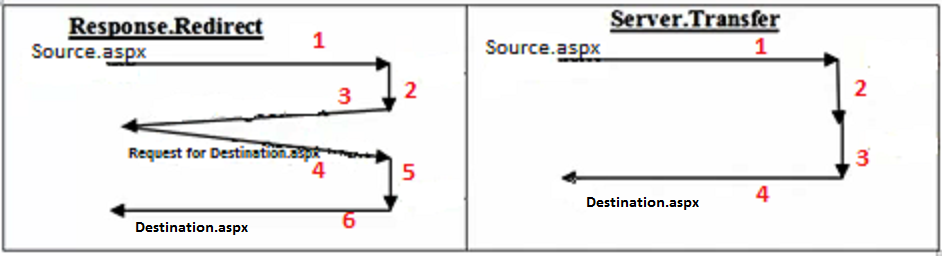
Difference between Response.Redirect and Server.Transfer in ASP.Net

Hi in this post, I will be exploring the Response.Redirect and Server.Transfer redirecting options available in ASP.NET

Response.Redirect is used to redirect the page to a page in the same server or different server
Server.Transfer is used to redirect the page to a page in the same server only

Example :
RR - Response.Redirect("LoginPage.aspx")
Response.Redirect("LoginPage.htm")
Response.Redirect("yourSiteName.com/LoginPage.aspx")

ST - Server.Transfer("LoginPage.aspx")

Working

Let, in Source.aspx there is a button (or LinkButton or ImageButton or any control that causes a post back) and the button event contains the code Response.Redirect or Server.Transfer

BLOGPIC - Copy

Passing Parameters to SQL Stored procedures using object of SqlParameter class in C#

Introduction -

Hi everyone, in this post I will explore one of the way of passing multiple parameters to the SQL Stored procedure.

Description -

When there are too many parameters to be passed to the stored procedure from the application, one of the easiest way is to pass it as an array object of SqlParameter class.
(The advantages of the above method is that apart from passing multiple values to the stored procedure we can also catch the return value from stored procedure)

Important properties

1)Direction - Gets or sets a value that indicates whether the parameter is input or output.
The permitted values are of type ParameterDirection enum
ParameterDirection.Input - indicates its an input parameter to the sp
ParameterDirection.Output - indicates its an output parameter from the sp
ParameterDirection.InputOutput - indicates it can behave as an input as well as an output paramter

Properties in C#

Hi all, in this post I will explore the concept of properties in C# this concept is same across different languages in .NET

Defn: A property is a member of a class that is used to write data into the data member and read data from the data member of a class.

A property can never store data, just used to transfer the data.

Need for properties

Consider a class
Class Employee
{
public String  EmpName;
public int  EmpID;
}

To use the data members of the class in another class we have to first create the object for the class and using the object we have to call the data members of the class as,

Employee obj1 = new Employee();
obj1.EmpName  =  CRL();
obj1.EmpID = Convert.ToInt32(CRL());
CWL(“Employee Name is s : ”obj1.EmpName);
CWL(“Employee ID  is  : ”obj1.EmpID);

In the above class the accessibility of the data members are public

Here in the above class the data members are public but if the data members have the accessibility as private then we cannot use obj1.EmpName or obj1.EmpID
Instead we can write the code as follows

Three Ways of Applying/Adding CSS to HTML

Hi Everyone,

In this post I will explore the ways of applying CSS to a  web page
I will be focusing only on ways of applying CSS and not on exploring CSS, hence prior knowledge of CSS is very much required.

There are three ways of applying CSS to our webpage
1)Inline
2)Internal
3)External